
Start with a compatible server
You do not need to develop Towfu to connect a server that implements the supported Control API. You do need that server connection to be configured. The guided installer and self-service registration for a new customer VPS are not ready yet. This guide covers an existing compatible setup and helps you identify what is missing.
Towfu's current VPS client expects Hermes Control API 1.0. It includes profiles, snapshots, persistent task records, events, revisioned approvals and private output handling. Hermes's official API server provides its own endpoints; installing that server alone does not establish compatibility with Towfu's adapter.
A server administrator or an agent working under your supervision can inspect these prerequisites. Keep setup credentials out of prompts, screenshots and support messages. Do not run a copied installer for a connector that has not been published and checked.
What your administrator supplies
- A VPS with Hermes, its provider login or API access, and the required bot profiles configured.
- A running compatible Control API behind a protected HTTPS origin.
- A Cloudflare Access service-token client ID and secret, plus a separate Hermes Control API key.
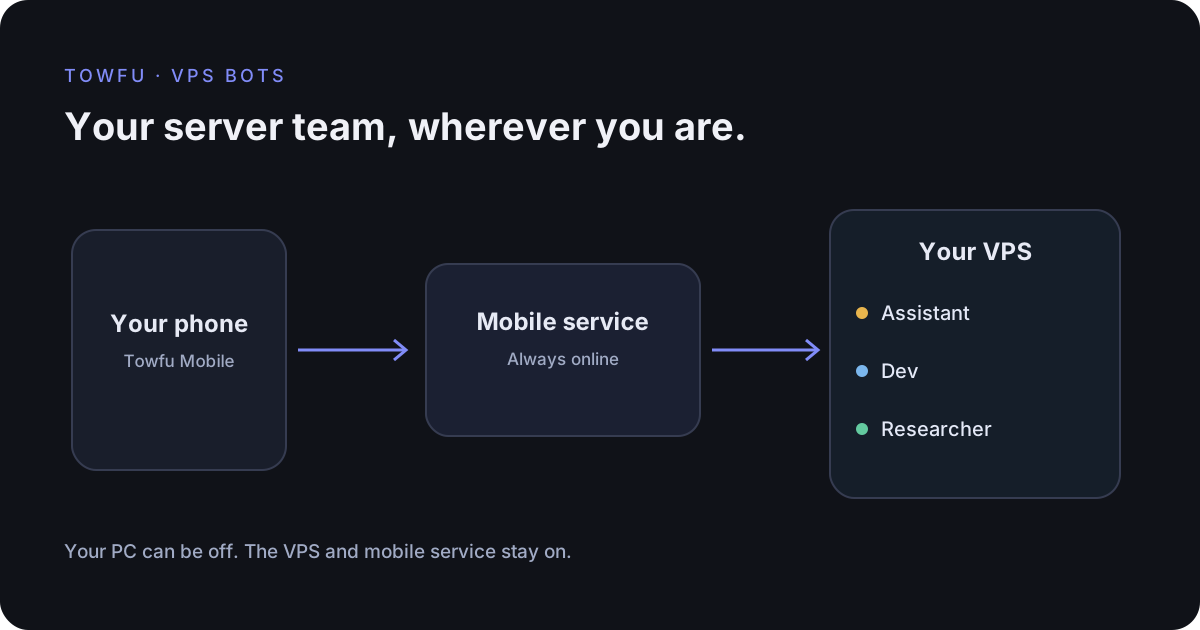
- Registration of that VPS with the always-on Towfu Mobile service if you want phone access.
The last step currently requires operator configuration. A working desktop connection does not register a new customer's VPS with the mobile service.
Cloudflare Tunnel can connect the private service without opening a public inbound listener. Authentication is a separate requirement. The automated Towfu connection uses Access service tokens; the administrator must configure the Access policy for that service-authentication flow. A tunnel name or public hostname is not a password.
Connect the desktop
- Open Chat → VPS Bots in Towfu.
- Choose Connect a VPS and give the connection a recognisable name.
- Enter the HTTPS API origin, Access client ID, Access client secret and Hermes API key supplied for this server.
- Choose Save and connect. Check the returned profiles and a saved conversation before sending work.
The credentials stay protected by Windows. The server determines the available tools, models and permissions. Displaying the default profile as Assistant does not create a different server profile or combine its memory with another bot. Separate named profiles retain their own memory.
If a capability is unavailable, investigate the server version or configuration. Do not solve an authentication error by opening an unprotected public port or placing a service key in a URL.
Pair the phone
- Select the saved VPS connection in the desktop and choose Connect phone.
- Show its pairing QR code. It is single use and expires after five minutes.
- Open Towfu Mobile in Your VPS mode. Scan the QR code or paste its link.
- Confirm Connect phone on the phone. Opening a link alone does not grant access.
- Choose Assistant or a specialist bot and check that the intended server and saved chats appear.
A phone receives access to that configured VPS through its own device session. Treat the pairing code like a temporary password. If it expires or has been used, request a new one. Keep it out of messages and shared screenshots.
Add the phone app to the Home Screen if you want an app-like view. Notification availability varies by browser and operating system, and requires your explicit permission.
Check the complete route
- Send a harmless message and inspect its reply.
- Try a saved conversation, a pending test approval and an explicitly opened private output.
- Use mobile data, switch off the PC and verify the phone still reaches the VPS.
- Close the phone app during a harmless task and check background notification delivery if you enabled it.
- Revoke a test device session and confirm that new requests and an already-open activity feed lose access.
Local tests with synthetic servers cover authentication, connection isolation, replay, expiry and the UI without purchasing another VPS. They do not prove an actual phone's push delivery, your firewall policy or a clean Linux installation. Keep those acceptance checks visible.
A prompt for setup assistance
Inspect my VPS read-only for a Towfu/Hermes connection.
Check the installed versions, API contract, service startup,
listening interfaces and authentication layers. Do not print secrets.
Compare with Towfu's supported Control API requirements.
Report missing prerequisites and exact proposed changes with rollback.
Do not alter the server until I approve the plan.
The goal is a reusable connection with clear ownership. Towfu presents the controls; your server administrator maintains Hermes, provider access, tool permissions, backups and upgrades.