The practical answer
Run unattended agents in their own worktree with no production credentials, a narrow task and hard caps on turns and time. Pre-approve only what the task needs, gate pushes and deletions, and treat the morning review as the real finish line, not the agent’s summary.
What unattended agents actually put at risk
An agent you are watching has a supervisor: you. When you leave, four things change.
- Writes. It can edit, create and delete files. In a throwaway worktree that is cheap. In your main checkout it is not.
- Pushes and merges. A push is hard to take back once other people or automation have seen it. Be aware that some modes allow it by default (see below).
- Spend and quota. A loop that retries a failing test for six hours can drain a day’s allowance, or a bill, before you wake up.
- Loops and stalls. The opposite problem is just as common: the agent stops at a permission prompt at 11 p.m. and waits until you return, which is safe but wasteful.
There is a security angle too. Simon Willison’s “lethal trifecta” describes the dangerous combination: an agent that can read private data, ingests content an attacker could have written (an issue, a web page, a dependency’s readme), and can send data out. An overnight agent with your secrets in its environment, internet access and a habit of reading untrusted text has all three. You do not need to be paranoid, but you should remove at least one of the three: no secrets, no outbound access, or no untrusted input.
Guardrails that work: isolation, permissions and caps
1. Isolate the work
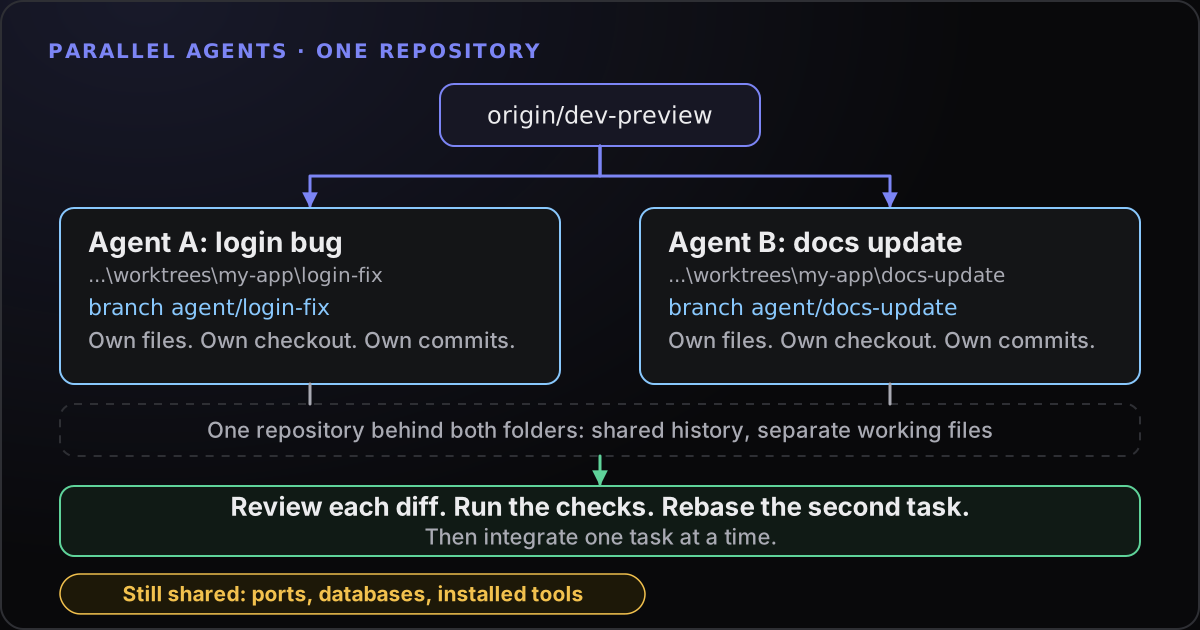
Give the run its own worktree and branch, as in the worktree guide. Nothing it does can touch your main checkout, and the worst case is deleting a folder and a branch. Separate worktrees do not isolate your whole machine, so add the rest:
- No production credentials. Do not leave production keys in the worktree’s
.envor in your shell. Claude Code’s auto mode treats reading.envand sending credentials to their matching API as allowed by default, so the file is only as safe as what is in it. Use test or sandbox credentials. - A real sandbox where you can get one. Anthropic documents sandboxing for Claude Code on WSL 2, not on native Windows, and recommends containers or VMs for its no-checks mode. OpenAI documents a Windows sandbox for Codex that runs natively in PowerShell. Pick the stronger boundary your setup allows.
- A narrow task. “Make the tests in the billing module pass” is a better overnight job than “improve the app”.
2. Choose the permission mode on purpose
Claude Code has several permission modes. In default (called Manual in the interface) it asks before most actions; acceptEdits auto-approves file edits; plan proposes without editing; auto lets a classifier review actions in the background; dontAsk denies anything not pre-approved; and bypassPermissions skips checks and is meant for isolated containers and VMs only. Anthropic warns that auto mode “reduces permission prompts but does not guarantee safety”.
For an overnight run, dontAsk with an explicit allow-list is the tightest fit: anything you did not list is denied instead of waiting for you. A non-interactive run in PowerShell looks like this:
cd C:\Projects\worktrees\my-app\billing-tests
claude -p "Follow TASK.md. Commit after each passing step. If you need a decision, write BLOCKED.md and stop." `
  --permission-mode dontAsk `
  --allowedTools "Read" "Edit" "Bash(npm test *)" "Bash(git add *)" "Bash(git commit *)" `
  --max-turns 40 --max-budget-usd 5
The flags are real, but check the examples against claude --help for your version. --max-turns and --max-budget-usd work in print mode (-p) only. The budget is a client-side estimate that can differ from your bill and can be passed, so leave headroom; on a subscription, --max-turns and your quota check are the practical caps. Neither flag limits wall-clock time. For that, use something outside the CLI, such as the Task Scheduler option to stop a task that runs longer than a set time.
If you prefer an interactive session in auto mode, know what it does by default. Anthropic’s list of blocked actions includes force pushes, production deploys, curl | bash and mass deletion on cloud storage, but pushing to any branch of the repository you are working in, including the default branch, is allowed. To keep a human on pushes, add an ask rule to your settings:
{
  "permissions": {
    "ask": ["Bash(git push *)"]
  }
}
Command rules match the command as written, so treat them as a guard rail, not a wall. A boundary you only state in conversation (“don’t push”) can be lost when context is compacted; for a hard guarantee, use a deny rule.
For Codex, codex exec runs non-interactively and accepts --sandbox (read-only, workspace-write or danger-full-access) and --cd to set the workspace root. Its --dangerously-bypass-approvals-and-sandbox flag is described as dangerous and only for an isolated runner. Start with workspace-write.
3. Set caps and stop conditions before you leave
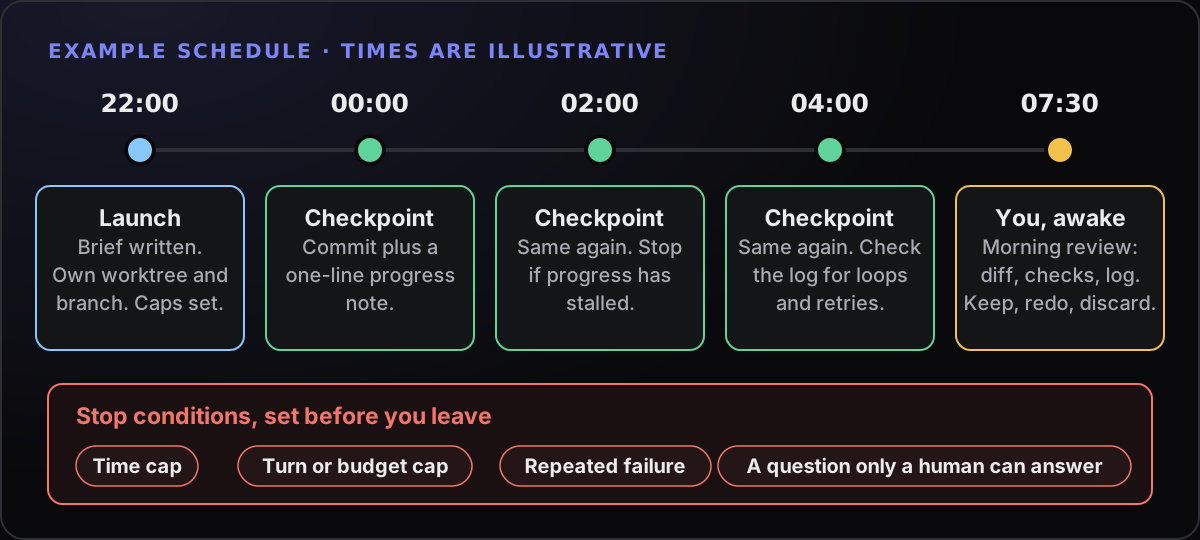
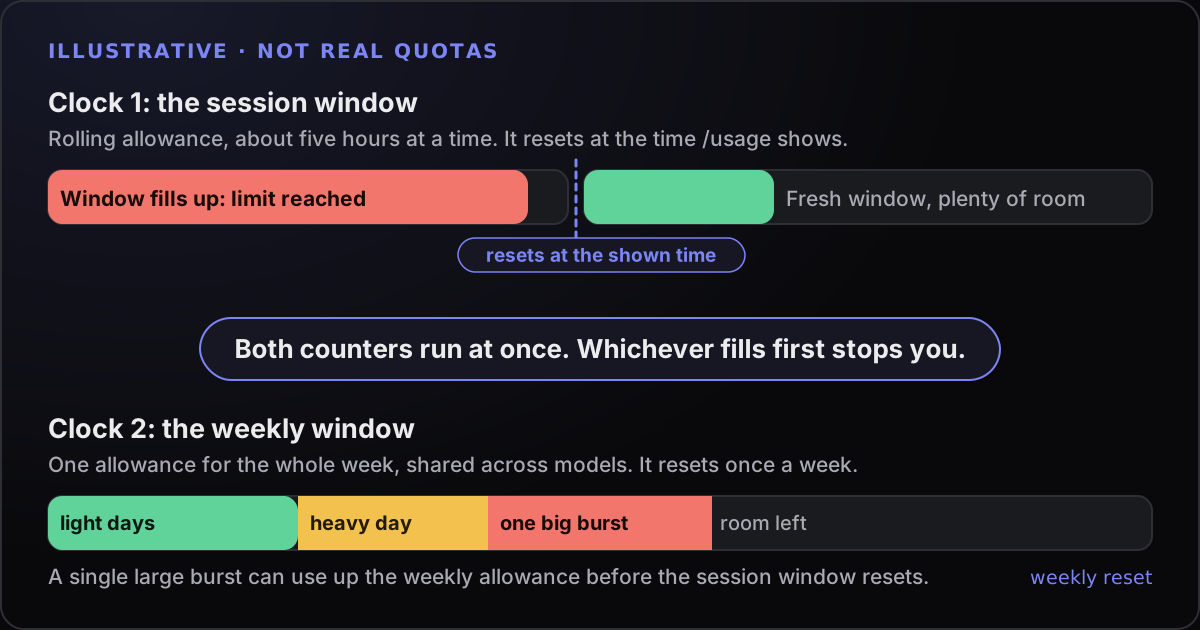
Two quiet behaviours can surprise you. First, if your login expires mid-run, an unattended session stops making progress; Claude Code warns at startup when a login is within three days of expiring, so renew first. Second, after a usage limit stops it, an interactive Claude Code session can wait and continue on its own when the limit resets. That is convenient, but it means the work may resume at 3 a.m. under whichever mode you left it in.
Which actions need a human gate
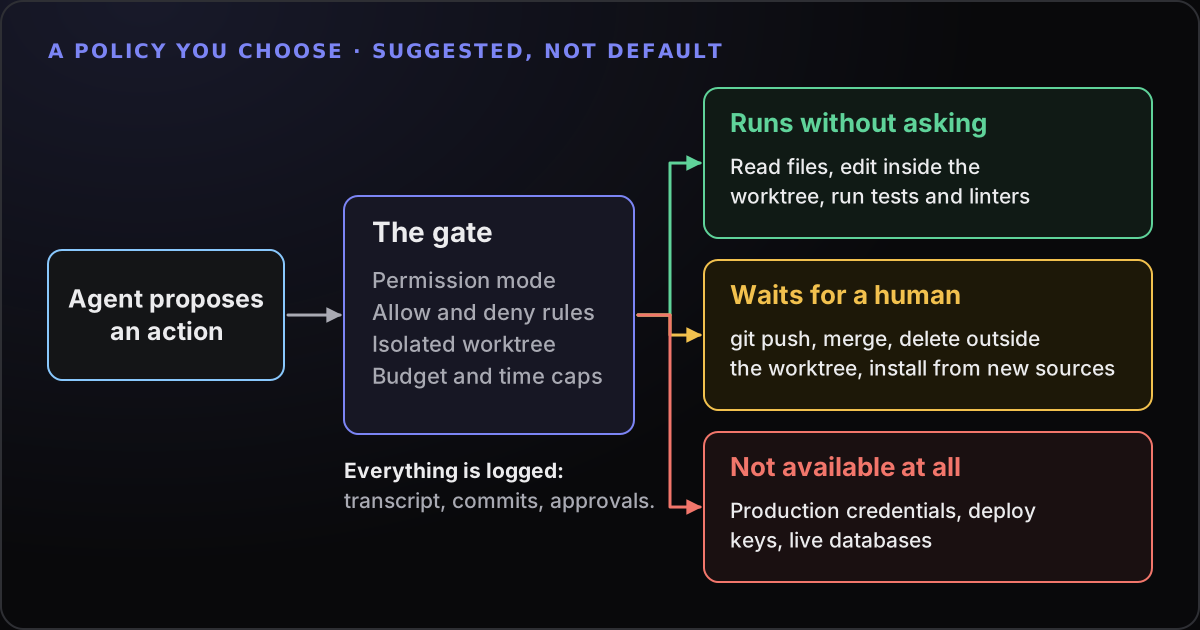
Not every action deserves the same trust. A simple three-way split is easier to apply than a long policy:
| Lane | Examples | How |
|---|---|---|
| Runs without asking | Reading files, editing inside the worktree, running the project’s tests and linters, committing to the agent’s own branch | Allow-list or accept-edits mode |
| Waits for a human | git push, merging, opening pull requests, deleting outside the worktree, installing from a new source, anything that spends money | Ask rules, or a mode that denies by default |
| Not available | Production credentials, deploy keys, live databases, cloud admin rights | Simply do not provide them |
The third lane is the only one that cannot fail by mistake. A control that depends on the agent following instructions is weaker than one that removes the capability. If a task truly needs a deploy, let it prepare the change and have a person run the deploy.
How many agents can you really supervise?
Fewer than you think. Every agent you start is a review you owe in the morning, and review is the slow part. Quota is the other limit: Anthropic’s documentation notes that running ten agents in parallel uses quota roughly ten times as fast as running one, and the usage limits guide explains why that matters.
A rule of thumb of ours, not a measurement: start with one overnight agent. Add a second only when you can review the first in a short sitting without skipping steps. If you find yourself approving diffs you have not read, you have too many. Keep tasks independent, with separate worktrees, so one failure does not contaminate another.
Some early signs that you are over-extended: a morning queue that takes longer to review than the agents took to produce, repeated “it said it passed” surprises, and branches nobody remembers starting.
The morning review routine
Treat the output like a pull request from a stranger. Do not start from the agent’s summary; start from the evidence.
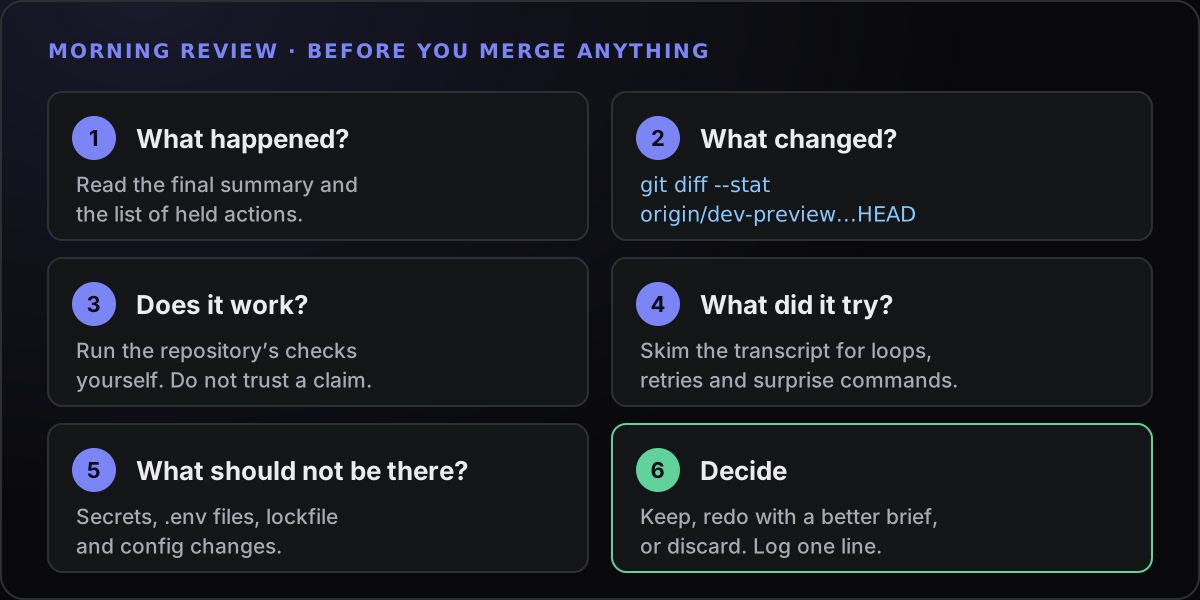
In PowerShell, the middle steps are a few lines:
cd C:\Projects\worktrees\my-app\billing-tests
git status --short
git log --oneline origin/dev-preview..HEAD
git diff --stat origin/dev-preview...HEAD
npm test
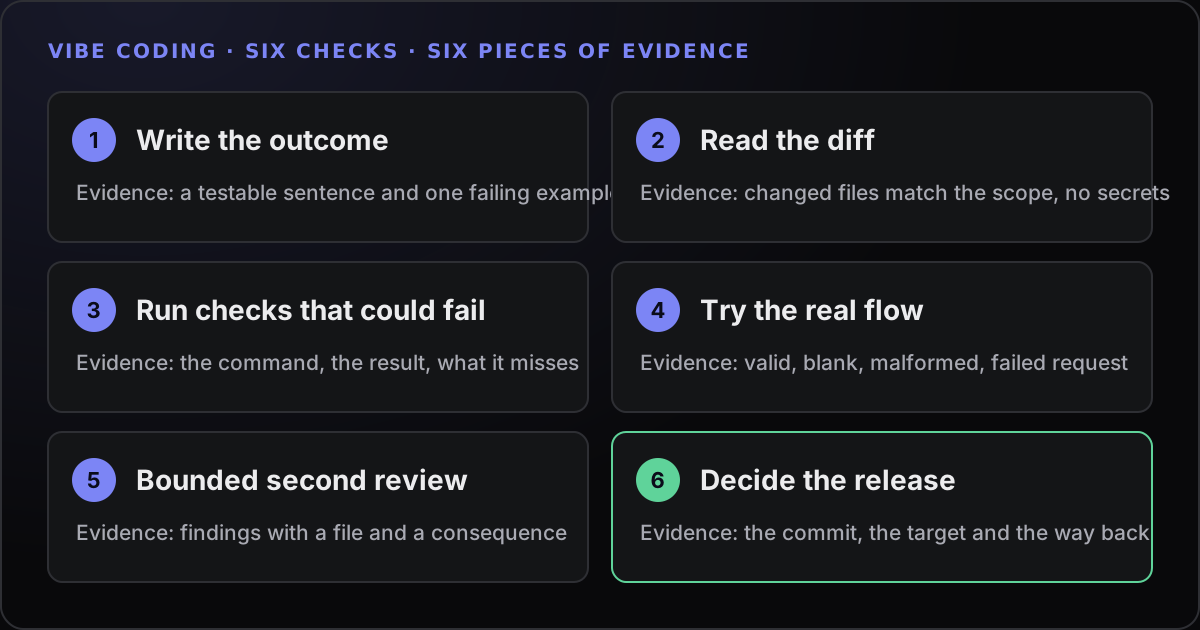
Replace npm test with the project’s own checks. Then read the actual diff, not just the stat. For changes that matter, run the vibe coding checklist. Pay particular attention to deleted or weakened tests, new dependencies, edits to configuration or CI files, and anything outside the scope you set.
Finally decide: keep it, redo it with a better brief, or discard the worktree. Discarding is a valid result. A discarded run that cost an evening of quota and taught you what to put in the next brief was not wasted.
A failure log you will actually keep
The brief gets better every time you write down what went wrong. Keep the log short enough that you do it at 8 a.m. One line or a few fields per run, like this illustrative entry:
Date:        2026-10-12
Task:        Make the billing tests pass (billing-tests worktree)
Outcome:     kept / redone / discarded
What broke:  looped 12 times on a flaky currency test; ignored TASK.md rule about not editing fixtures
Cost:        about 40 turns, stopped by --max-turns
Cause:       brief did not say the fixtures are read-only
Fix:         add "do not edit tests/fixtures" to the brief; mark the flaky test as known
Next time:   run the flaky test three times before touching code
Patterns show up within a week: the same missing sentence in the brief, the same flaky test, the same tool being blocked. Promote the recurring ones into your project instructions (CLAUDE.md or AGENTS.md) so every run starts with them.
Where Towfu fits: Away mode
Towfu’s Away mode is built for the stalled-prompt problem. After you confirm, Away automatically accepts agent approvals and answers questions with the recommended or default option. You can apply it globally, by project, or to a single terminal from its pane badge. Each session keeps a log of what was approved or held, and Settings offers an automatic off timer and an option to turn Away off when you return. Prompts it does not recognise can still wait for you.
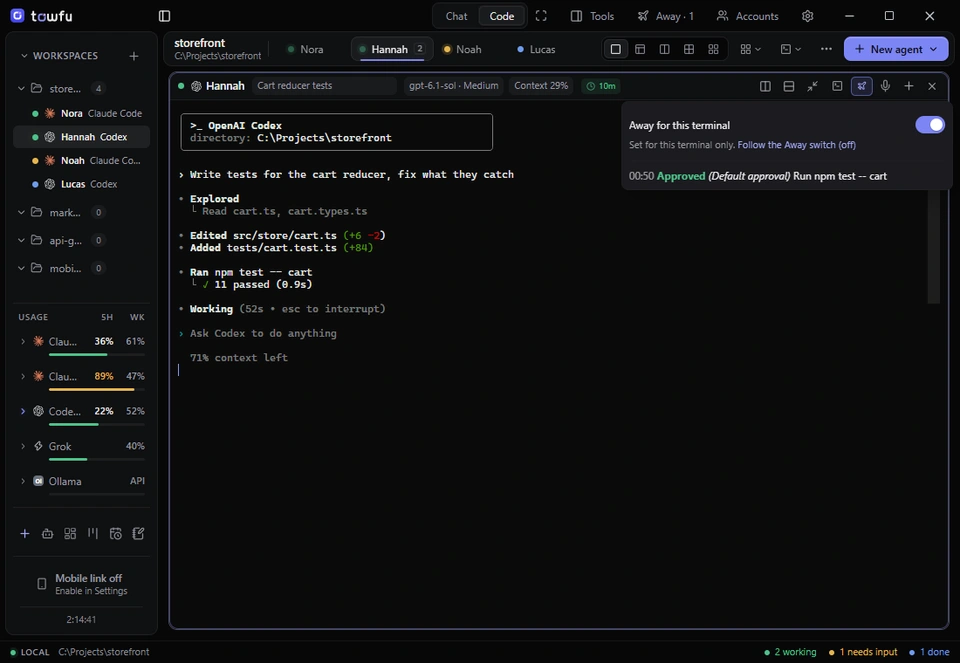
Be clear about what it is not. Away is a convenience, not a safety feature: it can approve destructive commands and changes outside your project, so enable it only for work you are comfortable letting continue. That is why the earlier sections matter more than the switch. Pair it with a separate worktree per agent (Towfu can create one for each), keep production credentials out of reach, and review the approval log in the morning along with the diff.